You can write an Excel macro in python to do whatever you would previously have used VBA for. Macros work in a
very similar way to worksheet functions. To register a function as a macro you use the xl_macro decorator.
Macros are useful as they can be called when GUI elements (buttons, checkboxes etc.) fire events. They can also be called from VBA.
Macro functions can call back into Excel using the Excel COM API (which is identical to the VBA Excel object model).
The function xl_app can be used to get the Excel.Application COM object
(using either win32com or comtypes), which is the COM object corresponding to the
Application object in VBA.
See also Python as a VBA Replacement.
Python functions to be exposed as macros are decorated with the xl_macro decorator imported
from the pyxll module.
from pyxll import xl_macro, xl_app, xlcAlert

@xl_macro
def popup_messagebox():
    xlcAlert("Hello")

@xl_macro
def set_current_cell(value):
    xl = xl_app()
    xl.Selection.Value = value

@xl_macro("string n: int")
def py_strlen(n):
    return len(x)
Macros defined with PyXLL can be called from Excel the same way as any other Excel macros.
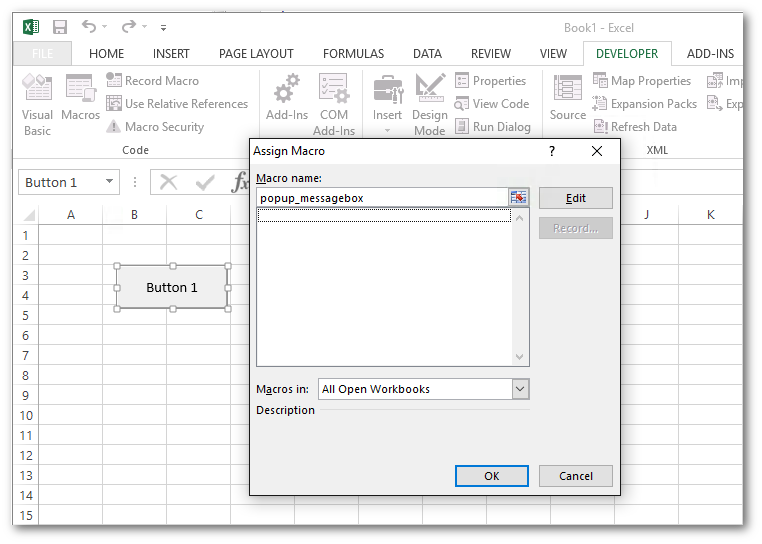
The most usual way is to assign a macro to a control. To do that, first add the Forms toolbox by going to the Tools Customize menu in Excel and check the Forms checkbox. This will present you with a panel of different controls which you can add to your worksheet. For the message box example above, add a button and then right click and select ‘Assign macro…’. Enter the name of your macro, in this case popup_messagebox. Now when you click that button the macro will be called.
Warning
The Assign Macro dialog in Excel will only list macros defined in workbooks. Any macro defined in
Python using xl_macro will not show up in this list. Instead, you must enter the name
of your macro manually and Excel will accept it.
It is also possible to call your macros from VBA. While PyXLL may be used to reduce the need for VBA in your projects, sometimes it is helpful to be able to call python functions from VBA.
For the py_strlen example above, to call that from VBA you would use the Run VBA function, e.g.
Sub SomeVBASubroutine
    x = Run("py_strlen", "my string")
End Sub
One of the main use cases for writing an Excel macro is to automate some task in Excel.
You may have done this if you’ve written any VBA in the past. When writing an Excel macro in VBA you have access to the Excel Object Model, the API that lets you script Excel.
The same Excel Object Model is available to you from Python. The entire API is exposed as a COM interface, which can be called from directly from your Python code.
PyXLL provides the helper function xl_app. This helper functions returns the Excel.Application
COM object as a Python object. Python has a handful of different packages for calling COM objects, and you can
select which you want to use via the com_package kwarg to xl_app. For most users, the default, pywin32
will be the best choice.
For more help understanding how to call the Excel Object Model from Python please see Python as a VBA Replacement.
The following code is an Excel Python macro that changes the current selection. It uses xl_app to get the
Excel.Application object, and then uses the Excel Object Model to make the selection.
from pyxll import xl_macro, xl_app

@xl_macro
def change_selection():
    # Get the Excel.Application COM object
    xl = xl_app()

    # Get a Range in the current active sheet
    xl_range = xl.ActiveSheet.Range("A1:D10")

    # Call the 'Select' method on the Range object
    xl_range.Select()
As the Excel Object Model is the same as the API used by VBA, if you’re not sure what methods and properties to use it can be helpful to use Excel’s VBA Macro Recorder feature. That will show you what methods and properties you need, and you can use the same methods and properties in Python.
For full documentation of the Excel Object Model please refer to Microsoft’s documentation here https://docs.microsoft.com/en-us/office/vba/api/overview/excel/object-model.
Warning
The xl_app helper function and the Excel Object Model should only ever be called from functions called by Excel as a macro.
Calling into Excel from anywhere other than a macro can cause Excel to crash without warning.
Never call the Excel Object Model from a background thread.
PyXLL has another helper function, schedule_call, that will schedule a plain Python function to run in an Excel macro, on the
main Excel thread. If you need to call into Excel from anywhere other than a macro, always use schedule_call to schedule a function
to do that safely.
If you are using Jupyter in Excel via the pyxll-jupyter package, that runs the cells inside and Excel macro and so it is safe
to use xl_app there.
Macros will often need to read values from Excel. We can do that using the Excel Object Model in the same way as you might have done from VBA previously.
For example, the following code gets a Range object and then gets the value using the Range.Value property.
from pyxll import xl_macro, xl_app

@xl_macro
def read_value_from_excel():
    # Get the Excel.Application COM object
    xl = xl_app()

    # Get a Range in the current active sheet
    xl_range = xl.ActiveSheet.Range("A1:D10")

    # Access the Value of the Range
    value = xl_range.Value
What you will notice when reading values this way is that you can’t control the type of the value you get. For example, in the code above we are using a range and the Python value obtained will be a list of lists. If we were to use a single cell, the Python value would be a single value.
You can use get_type_converter to access PyXLL’s type converters (including any custom type converters you may
have written) and use that to convert the raw value into the type you require. However, there is a slightly easier way.
Using the PyXLL class XLCell we can access the value as a specified type as follows:
from pyxll import xl_macro, xl_app, XLCell

@xl_macro
def read_value_from_excel():
    # Get the Excel.Application COM object
    xl = xl_app()

    # Get a Range in the current active sheet
    xl_range = xl.ActiveSheet.Range("A1:D10")

    # Get an XLCell object from the Range object
    cell = XLCell.from_range(xl_range)

    # Get the value as a DataFrame
    df = cell.options(type="dataframe").value
Writing values to Excel from Python is very similar to reading values, as shown above.
While you can set the Range.Value property directly, using XLCell.value is often more convenient
as it can do any type conversions necessary for you.
For example, to write a DataFrame to a range you can do the following:
from pyxll import xl_macro, xl_app, XLCell

@xl_macro
def write_value_to_excel():
    # Get the Excel.Application COM object
    xl = xl_app()

    # Get a Range in the current active sheet
    xl_range = xl.ActiveSheet.Range("A1")

    # Get an XLCell object from the Range object
    cell = XLCell.from_range(xl_range)

    # Create the DataFrame we want to write to Excel
    df = your_code_to_construct_the_dataframe()

    # Write the DataFrame to Excel, automatically resizing the range to fit the data.
    cell.options(auto_resize=True, type="dataframe").value = df
In the code above you can see that as well as converting the DataFrame to the type expected by Excel, XLCell
can also automatically expand the range that’s being written to fit the entire DataFrame.
For more details about the options available, see the XLCell class reference.
For macros that modify the workbook, having Excel update or recalculate after each individual change can result in poor performance.
It is quite common to temporarily disable Excel’s screen updating and automatic calculations while performing such changes to the workbook in a macro.
PyXLL provides the context manager xl_disable for this purpose. The same can be acheived
using the Excel Object Model (see Python as a VBA Replacement), but using xl_disable can be more convenient.
The following example shows how xl_disable can be used to temporarily disable screen updating
and automatic calculations while making an update to the workbook:
@xl_macro
def macro_function():
    with xl_disable():
        # do some work here that updates Excel where we do not
        # want Excel to automatically recalculate or update.
        xl = xl_app()
        xl.Range("A1").Value = 1

    # After the with block, Excel reverts to its previous calculation mode.
    return
Similar options are available when using the xl_macro decorator to disable updating and calculations
for the duration of the entire macro.
You can assign keyboard shortcuts to your macros by using the ‘shortcut’ keyword argument to the xl_macro
decorator, or by setting it in the SHORTCUTS section in the config.
Shortcuts should be one or more modifier key names (Ctrl, Shift or Alt) and a key, separated by the ‘+’ symbol. For example, ‘Ctrl+Shift+R’.
from pyxll import xl_macro, xlcAlert

@xl_macro(shortcut="Alt+F3")
def macro_with_shortcut():
    xlcAlert("Alt+F3 pressed")
If a key combination is already in use by Excel it may not be possible to assign a macro to that combination.
In addition to letter, number and function keys, the following special keys may also be used (these are not case sensitive and cannot be used without a modifier key):
Backspace
Break
CapsLock
Clear
Delete
Down
End
Enter
Escape
Home
Insert
Left
NumLock
PgDn
PgUp
Right
ScrollLock
Tab